Vim
Highly configurable modal text editor, an improved version of the Unix editor vi.
Screenshots
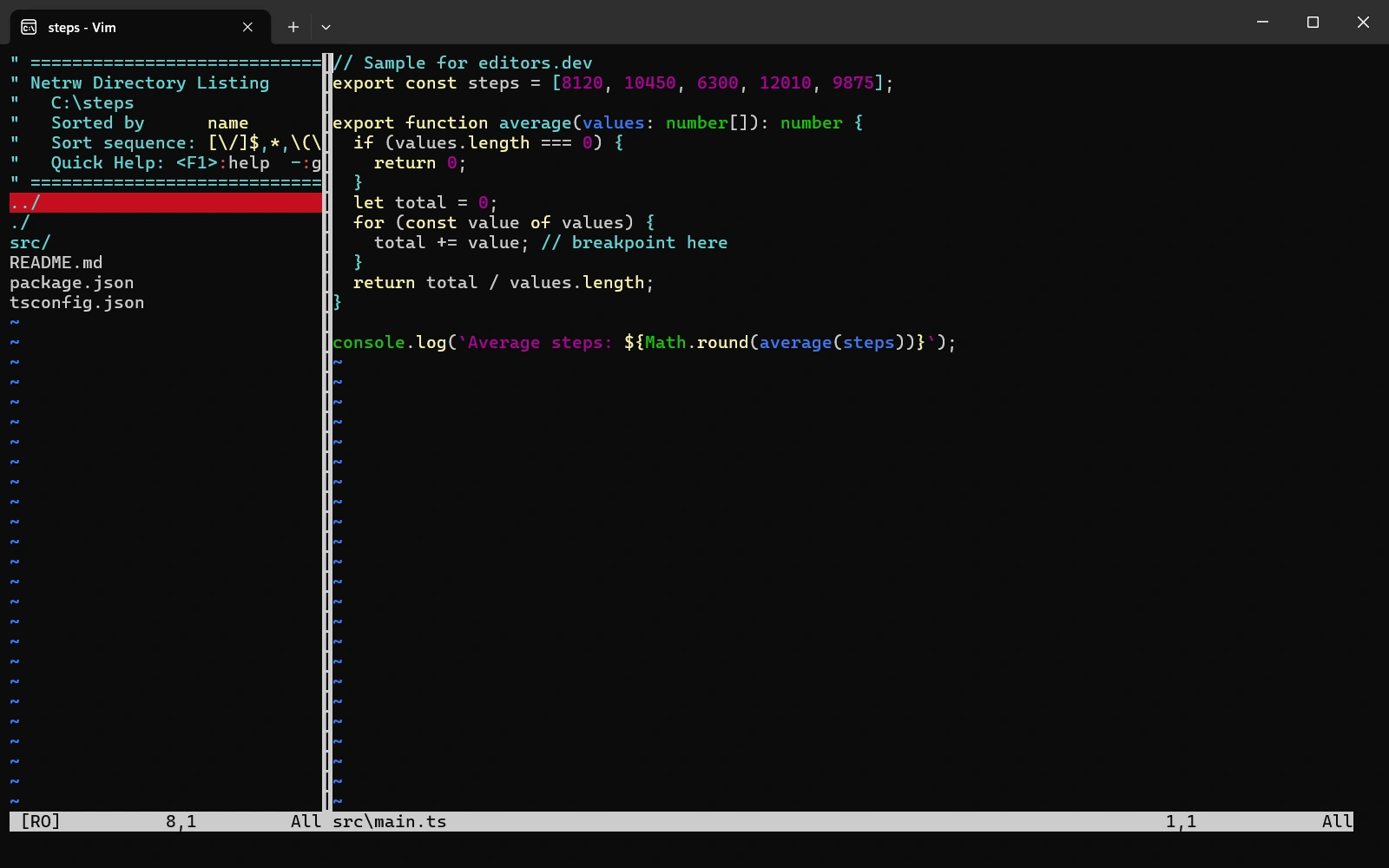
Screenshots of Vim 9.2.1310, taken on 20 November 2026 with the same sample project as every editor on this site. Method
About Vim
Vim is an improved version of the vi editor that is distributed with most UNIX systems. It runs in the terminal, and a graphical version (gVim) is also available. It is extended with Vim script and plugins. Since the death of its creator Bram Moolenaar in 2023 the project has been run by a group of maintainers, and version 9.2 was released in February 2026.
What it offers
- Vim stands for Vi IMproved. It adds features such as multi-level undo and syntax highlighting to vi.
- A terminal emulator runs inside a Vim window and is opened with the :terminal command, in builds compiled with the +terminal feature.
- Version 9.2 added enums, generic functions and a tuple type to Vim9 script, and fuzzy matching to insert-mode completion.
- A few optional packages ship with Vim, such as matchit, editorconfig and comment, and are enabled with :packadd. The bundled Termdebug plugin debugs programs with gdb.
- Version 9.2 added full support for the Wayland UI and clipboard, and a GTK 4 GUI was announced in May 2026.
What is built in
Listed only where we have checked it
- Debugger Extension
- Git integration Not listed
- Integrated terminal Built in
- AI assistant Not listed
- Remote development Not listed
- Live collaboration Not listed
- Vim mode Built in
Languages
How Vim supports each common language, and what you get with the recommended setup.
25 Built in 1 Community extension
- JavaScript Built in
- Completion : Yes
- Go to definition : No
- Refactoring : No
- Debugging : No
- Tests : No
- Formatting : No
Vim ships JavaScript highlighting and a basic omni-completion function (javascriptcomplete). Go to definition, rename and similar features need an LSP plugin such as yegappan/lsp or vim-lsp plus typescript-language-server.
Source ↗ - TypeScript Built in
- Completion : No
- Go to definition : No
- Refactoring : No
- Debugging : No
- Tests : No
- Formatting : No
Vim ships TypeScript and TSX syntax files, but no TypeScript completion. Completion, navigation and rename need an LSP plugin such as yegappan/lsp or vim-lsp with typescript-language-server.
Source ↗ - Python Built in
- Completion : Yes
- Go to definition : No
- Refactoring : No
- Debugging : No
- Tests : No
- Formatting : No
Highlighting is built in; the bundled omni-completion (python3complete) only works if Vim was built with +python3. Navigation, rename and formatting need an LSP plugin with a server such as pylsp.
Source ↗ - Java Built in
- Completion : No
- Go to definition : No
- Refactoring : No
- Debugging : No
- Tests : No
- Formatting : No
Vim ships Java highlighting and indent rules, but no Java completion. For completion and navigation, use an LSP plugin with jdtls.
Source ↗ - C# Built in
- Completion : No
- Go to definition : No
- Refactoring : No
- Debugging : No
- Tests : No
- Formatting : No
Vim ships a C# syntax file (cs.vim) and nothing more for C#. Completion and navigation need an LSP plugin with a server such as OmniSharp or csharp-ls.
Source ↗ - C++ Built in
With Termdebug (gdb)
- Completion : Yes
- Go to definition : No
- Refactoring : No
- Debugging : Yes
- Tests : No
- Formatting : No
Highlighting is built in, omni-completion (ccomplete) works from a ctags tags file, and the bundled Termdebug plugin (:packadd termdebug) debugs programs with gdb. clangd-based features need an LSP plugin.
Source ↗ - C Built in
With Termdebug (gdb)
- Completion : Yes
- Go to definition : No
- Refactoring : No
- Debugging : Yes
- Tests : No
- Formatting : No
Highlighting is built in, omni-completion (ccomplete) works from a ctags tags file, and the bundled Termdebug plugin (:packadd termdebug) debugs programs with gdb. clangd-based features need an LSP plugin.
Source ↗ - Go Built in
- Completion : No
- Go to definition : No
- Refactoring : No
- Debugging : No
- Tests : No
- Formatting : No
Vim ships Go highlighting, and K shows go doc output for the word under the cursor. Completion, navigation and formatting need an LSP plugin with gopls, or the separate vim-go plugin.
Source ↗ - Rust Built in
With rust.vim runtime files
- Completion : No
- Go to definition : No
- Refactoring : No
- Debugging : No
- Tests : Yes
- Formatting : Yes
Vim bundles the rust.vim runtime files: highlighting, :RustFmt (needs rustfmt), :RustTest and :Cargo commands. Completion and navigation need an LSP plugin with rust-analyzer.
Source ↗ - PHP Built in
- Completion : Yes
- Go to definition : No
- Refactoring : No
- Debugging : No
- Tests : No
- Formatting : No
Vim ships PHP highlighting and omni-completion (phpcomplete) for built-in functions; completing your own classes needs a ctags tags file. For full support use an LSP plugin with a server such as Intelephense or Phpactor.
Source ↗ - Ruby Built in
- Completion : Yes
- Go to definition : No
- Refactoring : No
- Debugging : No
- Tests : No
- Formatting : No
Highlighting is built in; omni-completion (rubycomplete) needs Vim built with +ruby, and K looks up documentation with ri. Navigation and rename need an LSP plugin with ruby-lsp or Solargraph.
Source ↗ - Kotlin Built in
- Completion : No
- Go to definition : No
- Refactoring : No
- Debugging : No
- Tests : No
- Formatting : No
Vim ships Kotlin syntax, indent and ftplugin files. Completion and navigation need an LSP plugin such as yegappan/lsp or vim-lsp with JetBrains' Kotlin LSP.
Source ↗ - Swift Built in
- Completion : No
- Go to definition : No
- Refactoring : No
- Debugging : No
- Tests : No
- Formatting : No
Vim ships Swift highlighting from the Swift project's own Vim files. Completion and navigation need an LSP plugin with sourcekit-lsp, which comes with the Swift toolchain.
Source ↗ - Objective-C Built in
- Completion : No
- Go to definition : No
- Refactoring : No
- Debugging : No
- Tests : No
- Formatting : No
Vim ships Objective-C and Objective-C++ syntax files, and the Objective-C ftplugin reuses the C settings. Completion and navigation need an LSP plugin with clangd.
Source ↗ - Dart Built in
- Completion : No
- Go to definition : No
- Refactoring : No
- Debugging : No
- Tests : No
- Formatting : No
Vim ships Dart highlighting and compiler files (:compiler dartanalyser) that load analyzer errors into the quickfix list. Completion and navigation need an LSP plugin with the language server from the Dart SDK.
Source ↗ - HTML Built in
- Completion : Yes
- Go to definition : No
- Refactoring : No
- Debugging : No
- Tests : No
- Formatting : No
Vim ships HTML highlighting and omni-completion for tags and attributes (htmlcomplete), plus a tidy compiler file for checking markup. Formatting needs an external tool or an LSP plugin.
Source ↗ - CSS Built in
- Completion : Yes
- Go to definition : No
- Refactoring : No
- Debugging : No
- Tests : No
- Formatting : No
Vim ships CSS highlighting and omni-completion for properties and values (csscomplete), plus csslint and stylelint compiler files. Rename and formatting need an LSP plugin with vscode-css-language-server.
Source ↗ - SQL Built in
- Completion : Yes
- Go to definition : No
- Refactoring : No
- Debugging : No
- Tests : No
- Formatting : No
Vim ships SQL highlighting for several dialects and omni-completion (sqlcomplete) for keywords and functions. Completing table and column names and running queries needs the separate dbext plugin.
Source ↗ - Shell Built in
- Completion : No
- Go to definition : No
- Refactoring : No
- Debugging : No
- Tests : No
- Formatting : No
Vim ships shell highlighting, K opens bash help or the man page, and :make runs ShellCheck if it is installed. Completion and rename need an LSP plugin with bash-language-server.
Source ↗ - Lua Built in
- Completion : No
- Go to definition : No
- Refactoring : No
- Debugging : No
- Tests : No
- Formatting : No
Vim ships Lua highlighting and indent rules. Completion and navigation need an LSP plugin with lua-language-server.
Source ↗ - R Built in
- Completion : No
- Go to definition : No
- Refactoring : No
- Debugging : No
- Tests : No
- Formatting : No
Vim ships R and R Markdown highlighting, though the R runtime files are looking for a new maintainer. Completion and navigation need an LSP plugin with the languageserver R package.
Source ↗ - Scala Built in
- Completion : No
- Go to definition : No
- Refactoring : No
- Debugging : No
- Tests : No
- Formatting : No
Vim ships Scala and sbt highlighting. Completion and navigation need Metals through an LSP plugin.
Source ↗ - Haskell Built in
- Completion : No
- Go to definition : No
- Refactoring : No
- Debugging : No
- Tests : No
- Formatting : No
Vim ships Haskell highlighting and compiler files for ghc, cabal and stack; the bundled omni-completion only covers LANGUAGE pragmas and GHC options. Code completion and navigation need an LSP plugin with haskell-language-server.
Source ↗ - Zig Built in
- Completion : No
- Go to definition : No
- Refactoring : No
- Debugging : No
- Tests : No
- Formatting : No
Vim ships Zig highlighting and compiler files, so :make runs zig build in a project. Completion and navigation need an LSP plugin with zls.
Source ↗ - Julia Built in
- Completion : No
- Go to definition : No
- Refactoring : No
- Debugging : No
- Tests : No
- Formatting : No
Vim ships Julia highlighting and indent rules from the julia-vim project; typing LaTeX-style Unicode symbols needs the full julia-vim plugin. Completion and navigation need an LSP plugin with LanguageServer.jl.
Source ↗ - Elixir Community extension
With vim-elixir
- Completion : No
- Go to definition : No
- Refactoring : No
- Debugging : No
- Tests : No
- Formatting : No
Vim ships only an Elixir ftplugin for comment and indent settings, with no syntax file, so highlighting comes from the community vim-elixir plugin. Language features need an LSP plugin with Expert or ElixirLS.
Source ↗
Who it is for
Who it suits
- Developers who work in a terminal on UNIX-like systems and want vi-style modal editing.
- Developers who need the same editor on Windows, macOS and Linux, in the terminal or as a graphical application.
- People who want to configure and script their editor in detail with Vim script and plugins.
Who should look elsewhere
- People who want an editor that guides them from the first launch. The official site describes Vim as a tool whose use must be learned.
- Developers who want a debugger for many languages ready in the editor. The bundled Termdebug plugin works only with gdb-compatible debuggers.
- People who are looking for a word processor. Vim is not built for WYSIWYG editing of typeset documents.
Vim pricing
Free and open source under the Vim license, which is GPL-compatible. Vim is charityware: users are encouraged to donate to help children in Uganda. Since ICCF Holland closed at the end of 2025, donations go to its sister charity Kuwasha in Canada.
Price Free Open source
Vim next to its alternatives
The same facts for each editor, taken from the directory.
| Editor | Type | Price | Built with | Platforms | Languages built in | Remote development | Live collaboration | Vim mode |
|---|---|---|---|---|---|---|---|---|
| Vim | Terminal | Free Open source | C, Vim script | Windows · macOS · Linux | 25 / 26 | –Not listed | –Not listed | Built in |
| Neovim | Terminal | Free Open source | C, Lua, Vimscript | Windows · macOS · Linux | 0 / 26 | –Not listed | –Not listed | Built in |
| Helix | Terminal | Free Open source | Rust | Windows · macOS · Linux | 25 / 26 | –Not listed | –Not listed | Not supported |
| Kakoune | Terminal | Free Open source | C++ | macOS · Linux | 25 / 26 | –Not listed | –Not listed | –Not listed |
| GNU Emacs | Editor | Free Open source | C, Emacs Lisp | Windows · macOS · Linux | 18 / 26 | Built in | Extension | Extension |
| Micro | Terminal | Free Open source | Go | Windows · macOS · Linux | 26 / 26 | –Not listed | –Not listed | Not supported |
Built in Extension Not supported
Head-to-head comparisons
All comparisonsSources
Last checked: 16 November 2026